See it. Do it. Done.
Check off a task right from your widget. Open an event with a tap. Keep moving through your day.
Coming to iPhone
Your tasks, your events, a little perspective.
Together in a widget that feels like you.
 NowfoldOverview
Interactive web preview · example day
Less opening apps. More getting on with it.
Your home screen already has your attention.
Give it something useful to say.
Check off a task right from your widget. Open an event with a tap. Keep moving through your day.
A busy calendar or a longer to-do list? Arrange the blocks and give the things that matter more space.
Today’s date, the week ahead, the year passing by. Just enough context, without another dashboard to manage.
Add your first module below.
Send proposal
Book dentist
Buy groceries
10:00Design review
12:30Lunch with Alex
15:00Project catch-up
Smoked glass · Whole widget
A look inside the widget editor · animated demo
Your space, your layout
Give your tasks the spotlight. Keep your next event close. Or leave space to see the bigger picture.
Build your own Overview widget with blocks you can arrange, resize and style. Save a few versions. Pick the one that fits.
Find your everyday viewRight where your day begins
A task off your mind. Your next event, right there.
Small actions that keep your day moving.
Tap a task in the widget. Watch it make room for what’s left.
Tap an event to see where you’re headed next.
Review the latest screens and agree on the next steps.
Demo calendar
Europe / Paris
Your day in NowfoldFRI 11Your tasks stay. Pick a calendar to bring its events back.
Try selecting a calendar · example data only
Works with Apple Calendar
Bring the calendars already on your iPhone into Nowfold, including iCloud. Your events sit beside your tasks, in the app and on your home screen.
Work, personal, or both. Choose which calendars appear in Today, Calendar and your widgets.
Events and alerts stay managed in Apple Calendar. Nowfold brings them into your day.
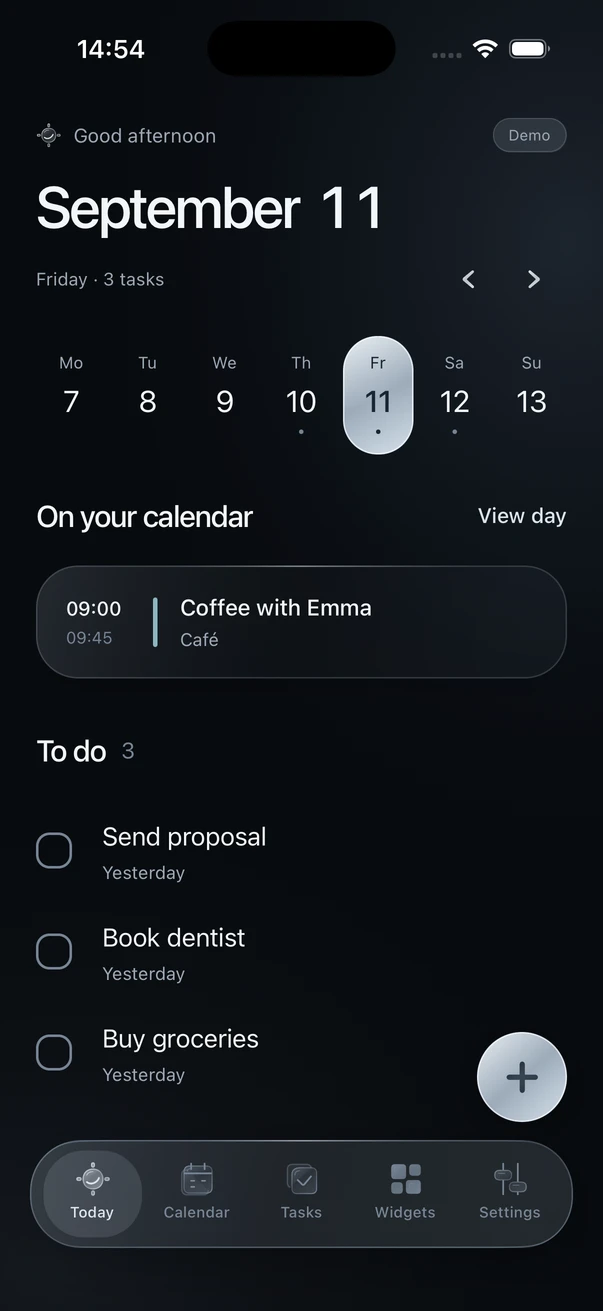
And when you open the app
A clear view of today. A task added with just a title. Your calendar a tap away.
The same quiet details, from your home screen to the rest of your day.
A small app. A conversation worth having.
I shared an early look at Nowfold on Reddit. People asked to try it, shared what they’d want on their home screen, and helped shape what comes next.
It’s still early. That’s a good time to be part of it.
See the conversation on RedditA few things you might be wondering
Nowfold is an iPhone daily planner that brings your tasks and events together. Customizable home screen widgets put your day in view, with tasks you can complete without opening the app.
Not quite. Nowfold is still in development. Early access will open when the first test version is ready. There’s no confirmed release date yet.
Yes for Apple Calendar: the current prototype reads the calendars you select on your iPhone, including iCloud, and shows their events in Today, Calendar and widgets. Manage those events and alerts in Apple Calendar; events created in Nowfold stay local. Apple Reminders sync is being considered, but isn’t available or promised for the first release.
Allow calendar access on your iPhone, then select the calendars to show. Nowfold refreshes when you open the app or your calendars change. iOS controls when widgets refresh. This connection reads your events; editing, deleting and alerts stay in Apple Calendar.
In the Overview widget, you can arrange and resize the date, year progress, week, tasks and upcoming events. Adjust the look, add task or event shortcuts, and save different layouts for your home screen.
The plan is a useful free version, with optional premium features. Pricing and the exact split are still being worked out.
No Nowfold account is required. Tasks and events created in Nowfold stay on your device. Connected calendars remain with their existing provider. Joining the early-access list will be optional and separate from using the app.
A more considered kind of daily planner
Your next home screen is taking shape.
Get a heads-up when it’s ready to try.


